
How I Reorganized All My Repos with AI (and Refreshed My GitHub Profiles Along the Way)


For years, I kept piling up projects like it was nothing.
One day you have a repo for a quick idea, another for an experiment, another for a proof of concept that you’ll “organize when you have time”… and before you know it, you’ve got repos scattered across several folders, duplicate remotes, origins pointing to old organizations, and a GitHub profile that doesn’t even come close to showing what you do today.
And if, like me, you have two GitHub profiles (one personal and one professional), it’s the perfect storm.
In this article, I want to walk you through the entire process I followed to:
- Centralize my projects locally.
- Review which repos no longer made sense.
- Decide what lives in each profile (antoniolg personal and devexpert-io professional).
- Migrate repos and adjust
originwithout losing anything. - Keep only active projects locally (and let the rest live on GitHub).
- And, in the end, make my GitHub profiles look nice and coherent.
But above all, I want to show you the approach: because the idea isn’t for you to copy my repos, but to copy a method that helps you organize yours.
The Real Problem (It Wasn’t the Code)
When we talk about AI in programming, the conversation usually goes, “wow, it writes code so well.”
But in this story, the most valuable thing wasn’t that the AI wrote any code.
The important part was using it as an assistant for a complex, tedious, and risky task:
- Tons of scattered information.
- Manual decisions (keep this, toss that, this goes here…).
- Risk of deleting something important.
- And that classic feeling of “I don’t even know where to start.”
AI was my “obsessive PM” and my “operations assistant”: it helped me take inventory, spot inconsistencies, propose a plan, and keep track of decisions without losing my mind.
The Goal (Very Concrete)
Before touching anything, I set a simple, measurable goal:
- Centralize everything in
/Users/antonio/Projects. - Review which projects were no longer useful (archive first, delete only if safe).
- Migrate what needed to be moved between profiles and update
origin. - Update both GitHub profiles to reflect what’s active.
- Keep only what I’m using locally.
The key was in this phrase: “without losing anything important.”
So the process had to be incremental, with checkpoints, and with a golden rule:
Don’t delete anything “blindly.” First inventory, then decisions, then execution.
Step 1: Local Inventory (Before Making Any Judgments)
The first thing was to answer a question that seems silly, but isn’t:
How many repos do I have, and where are they?
In my case, they were spread across several folders (like AndroidStudioProjects, IdeaProjects, etc.). AI helped me go through them and generate an inventory with useful signals, per repo:
- Whether it had an
originor not. - Which owner it pointed to (personal, org, third parties, old orgs…).
- If it was “dirty” (uncommitted changes).
- If it was “ahead/behind” the remote.
- If it had stashes.
The result was pretty eye-opening:
- 106 local repos.
- 16 without
origin(local only, no remote). - 56 with local changes (dirty).
- Some with commits not pushed.
- And several pointing to owners other than my two profiles.
That inventory alone already changes your perspective: it stops being a “feeling of chaos” and becomes a finite list of things to resolve.
Step 2: Remote Inventory (Both Profiles)
The next step was to do the same, but remotely.
For this, I used the GitHub CLI (gh), because it lets you list repos and pull data quickly without fighting the UI.
Here the question was:
What repos exist on GitHub under antoniolg and devexpert-io, and which ones don’t have a local equivalent?
The remote inventory was:
antoniolg: 98 reposdevexpert-io: 48 repos
And the important part came after: cross-referencing that info with the local one.
Step 3: Reconciliation (Cross-Referencing Data and Finding “Problems”)
This is where AI shines, because it’s a perfect task for it:
- Lots of data.
- Clear rules.
- Tabular output for decision-making.
What we’re looking for with the cross-check is to spot, for example:
- Local-only repos (no
origin). - Local repos with
originpointing to third parties. - Repos that should exist remotely but don’t show up.
- Repos that exist remotely but aren’t local (and deciding whether to clone or ignore them).
One of the most useful things was turning all this into “actionable lists” (like: “no origin”, “other owners”, “missing remote”…), to review in batches instead of going in blind.
Step 4: The Decision Method (No Web App, Please)
At some point I thought: “Should I build a web tool for this?”
And the answer was: no need.
For this kind of task, the most efficient thing is something very simple:
- A structured inventory (TSV/CSV).
- A decision flow.
- And a log of what you’re doing so you don’t repeat steps.
AI suggested and set up a system of “decision sheets” where, repo by repo, we’d note:
- Action (keep, archive, migrate, delete local…).
- Destination (personal profile or org).
- Notes (what it is, why it stays, what depends on what…).
This might not sound like much, but it’s what prevents the classic disaster:
“I think I already migrated this… wait, no, it was the other one…”
Of course, I didn’t touch these files manually—they were the log so the AI knew where we were in the process.
Step 5: Simple Rules for a Complex Mess
Even though there were manual decisions, there were some rules that made things a lot simpler.
For example, I had old repos pointing to an organization with an outdated name (DevExperto). The rule was:
- Everything under
DevExperto/*must live indevexpert-io/*.
That didn’t mean it had to be done automatically without checking, but it gave a clear direction, and AI could help spot all the cases.
Step 6: Execution (Move, Migrate, Clean Up)
Here’s where you need to be careful: the important thing isn’t to “do it fast,” but to do it safely.
In my case, the final local goal was very clear: everything under /Users/antonio/Projects.
And the final operational goal was this:
- Keep only active repos locally.
- Make sure everything important is on remote.
- Migrate repos to the correct owner (personal vs org).
- Adjust
originso the repo “knows” where it lives.
In the end, the result was:
- 12 active repos in
devexpert-io - 18 active repos in
antoniolg
The rest were either archived/remotely stored, deleted locally, or kept as historical (depending on the case).
Step 7: GitHub Profiles (The Part People Actually See)
Here comes an uncomfortable truth:
You can have your repos perfectly organized… and still, your GitHub profile can look abandoned.
So, once the groundwork was more or less done, I moved on to the visible part:
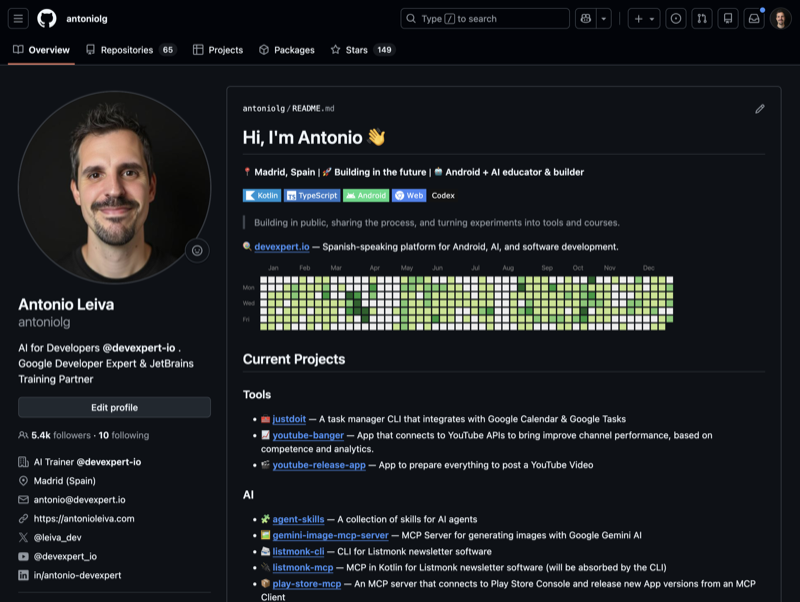
Personal Profile (antoniolg)
The goal was for it to reflect what I do today:
- “Current” projects.
- Links with badges (cleaner than a list of links).
- Sections that add context (like “Milestones”).
- A small “callout” to devexpert.io.
- GitHub activity in a logical spot.
- And, while I was at it, integrate things like recent articles or talks (so anyone visiting has 4-5 things to get a sense of what I do).
If you’re interested, you can check out the profile README repo here: antoniolg/antoniolg.
Organization Profile (devexpert-io)
Here was an interesting detail: the org didn’t even have a profile repo.
We set up the basics:
- Repo
devexpert-io/.github profile/README.md- List of featured repos
- “Human” descriptions
- Social badges
- Extra sections (recent articles, talks, “about Antonio” to give context about the creator)
And from there, iterate.
It wasn’t about “making the perfect README,” it was about making it alive: something you can improve in 10 minutes when your focus shifts.
A Screenshot (So You Get the Idea)
Here’s how the personal profile looked after this iteration:
The Key Idea: AI as an Assistant, Not Just a Code Generator
If there’s one thing you should take away, let it be this:
AI isn’t just for writing functions or refactoring.
It’s also incredibly useful as an assistant for:
- Organizing information.
- Creating inventories.
- Spotting inconsistencies.
- Proposing an action plan.
- Turning “something big” into a list of small steps.
- Keeping a log of decisions.
And that, day to day, is gold.
Because most of the tasks that slow us down aren’t “technically hard.” They’re hard because of volume, dispersion, or lack of clarity.
If You Want to Do It Yourself (Without Suffering)
My recommendation, if you’re thinking about something similar:
- Make a local and remote inventory.
- Cross-check both worlds and create “actionable lists.”
- Decide calmly (archive before deleting).
- Execute carefully and with checkpoints.
- And finally, update your profiles so they tell your current story.
If you’re also at that point of “I really need to organize this once and for all”… do yourself a favor: don’t do it by hand and in the dark. Use AI as your assistant.
- 87e8012 · · What is Loop Engineering? A practical example with Codex
- 16bfc92 · · I Don't Think the Token Subsidy Is Going Away. And That Says a Lot About the Future of AI

AI Expert · taught in Spanish
Learn to direct AI
Six live weeks to build your AI development harness with agents, on your own project.
starts 3 November
View the program