
MCPs Aren't Dead—They're Just Out Partying


There’s a strange obsession with killing off MCP servers (Model Context Protocol) that I just can’t wrap my head around.
It’s true that at one point they were overused. We were at the dawn of AI agents, and it was one of the big revolutions.
And when you have a hammer and want to use it, you see nails everywhere.
But no, not everything was a nail.
In the last few weeks, we’ve seen the internet ablaze demanding their heads. There have even been “Funerals for MCPs”.
But no, MCPs still have a lot of life left in them. My prediction is that in the future, every company will have its own API and its own MCP.
I’ll tell you why at the end. But for now, let’s take a little trip down memory lane.
What are MCPs?
In case anyone’s new here, MCP is a protocol created by Anthropic that was later standardized. They sold it as the USB-C of AI.
Before, when you wanted to connect an agent to an external service, you had to code your own agent and your own tools by hand, and those weren’t reusable in any other agent.
I’m sure you’ve seen, or even used, some of the integrations ChatGPT and others made. All of that was implemented manually.
LLM APIs offer the concept of tools, which means you explain to the model that it has certain tools it can use, and give it a description of when to use them. The model tells you when it wants to call them, you call them in code, and return the result.
But this doesn’t scale, because it’s deeply embedded in your agent’s code.
To standardize that communication, the MCP protocol was born. A client implements the protocol, and then it knows how to use MCP servers. No matter how it’s done, if the client and server follow the protocol, they can talk to each other.
These MCPs offer tools.
Some offer a lot of tools.
A whole lot.
The Problem with MCPs
MCPs flooded the world, especially the developer world. People joked (half seriously, half not) that there were more MCP servers than users 😄
But there was a problem: they flooded the context.
Each MCP offers some tools, and each tool definition has a ton of info about how to call it, its arguments, their types, what each one is for…
In big MCPs, this ate up a huge chunk of the context window.
A classic example was the GitHub MCP. When Copilot CLI launched, which came with the GitHub MCP installed, the context window was already 35% full right from the start. Ridiculous.
CLIs to the Rescue
Some people started to realize that this whole MCP thing was getting out of hand.
The GitHub case was especially telling, and in fact I made a video about it: what’s the point of using an MCP when a CLI is right there, the agent can discover it by calling --help, and for the most popular ones, the agent already knows how to use them without any instructions?
Just ask any agent to use gh, and it’ll do it without batting an eye.
Obviously, in some cases they were a bit slower—if it was a custom or lesser-known CLI, you had to do a few tricks like adding a little permanent context explaining the basics of how to use the CLI.
But then skills arrived.
And that’s when MCPs really started to fade.
Skills Change Everything
Skills are a really interesting concept from a logic standpoint: a context that loads dynamically only when the agent needs it.
In one fell swoop, all those MCPs that just made 4 simple API calls disappeared.
All those MCPs that mimicked a CLI, and were even better because agents didn’t know how to use them, also vanished.
The skill craze led everyone to start converting MCPs into skills, or into CLI + skill combos.
So What Now? Are We Ditching MCPs?
As developers, we often think OUR world is THE world. And that’s just not true.
Imagine Paco the baker discovers AI agents. I don’t know, maybe he reads somewhere that Claude Desktop is really cool and can help him with his invoicing.
So he installs it on his computer.
Now try explaining to Paco that he needs to go find a CLI for the accounting tool he uses, install it, and find a skill (or even make his own) that tells the agent how to use it.
Then also tell him he should update the CLI and the skill from time to time, because maybe the tool’s API has changed.
And do that for every tool he wants to integrate with his agent.
Even just installing Claude Desktop might be a hurdle. Imagine he uses the Claude app on his phone, or ChatGPT. How does he install a CLI there? He can’t, for obvious reasons.
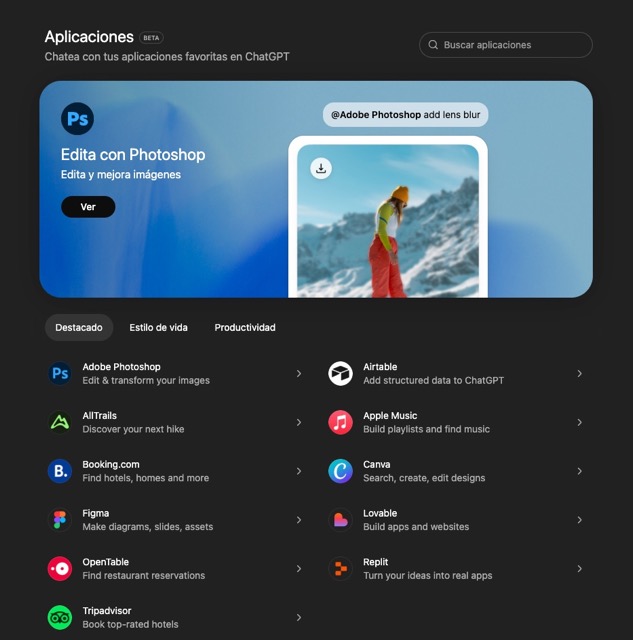
But what if, instead, there was an app store or connector marketplace inside these tools where, with one click, you could install and start using the service?
Well, this isn’t science fiction. It exists, and guess what… Those Apps are MCPs.
MCPs Aren’t Going Anywhere. In Fact, They’re Getting Upgrades
What I’ve told you is just a small part of what’s coming.
Not long ago, the protocol added the option to allow MCPs to serve UI that can be displayed in the client.
There are already some MCPs using this, and again, it standardizes how graphical interfaces are shown inside agents.
If the future, as they say, is about constantly interacting with a chatbot, for more complex tasks we’ll need an interface, and this can be generated dynamically through an MCP.
As a Developer You Might Not Use Them, But Your Company Needs Them
A lot of times, it’s hard for us to see beyond the tech we use day to day.
But if we zoom out a bit, we’ll realize these aren’t everyday consumer tools, and that the general public needs simpler options.
MCP stores (which of course won’t be called that) are going to be the norm in the future, and having your company’s product published there will be a huge competitive advantage.
And even if that’s not the case, today both ChatGPT and Claude let you install your own MCPs.
In my Postflow project I’ve been adapting MCP so it works in these environments. Because if you want to reach the masses, sooner or later you’ll have to be there.
Anyway, all this to say that I don’t think MCPs are going anywhere, and you should spend some time understanding them and learning how to use them.
You’re going to need them.
- 021364e · · How I Reorganized All My Repos with AI (and Refreshed My GitHub Profiles Along the Way)
- 87e8012 · · What is Loop Engineering? A practical example with Codex

AI Expert · taught in Spanish
Learn to direct AI
Six live weeks to build your AI development harness with agents, on your own project.
starts 3 November
View the program